

Download A2 Media Player Pro – Free Windows Audio Player, MP3 & Multiformat Tool
Overview of A2 Media Player Pro
A2 Media Player Pro is a lightweight, free audio player designed for Windows platforms ranging from the classic Windows 95 era up to modern releases. Although the software dates back to the early 2000s, its core functionality remains solid for users who need a no‑frills, reliable player for MP3, WAV, and other common audio formats. The program’s latest public update (v2.51) was released on September 15 2005, yet it still garners steady interest, reflected in over 121 thousand downloads since its catalog entry in 2003. Its small installation footprint makes it an attractive choice for older machines or users who prefer to keep their system lean.
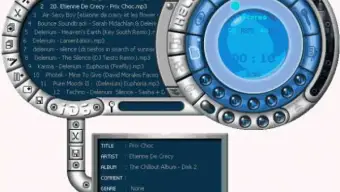
The interface follows a straightforward, Windows‑style layout with a playlist pane, equalizer controls, and basic playback buttons. While it lacks the flashy skins of modern players, A2 Media Player Pro compensates with fast load times and a minimal CPU footprint, which is why it continues to be popular in regions such as the United States, Indonesia, and Kenya. The application is distributed exclusively in English, and it targets the “Audio Software” category under the “Players” sub‑category, specifically MP3 & Multiformat.
For anyone looking for a secure, free download that doesn’t demand constant internet connectivity or invasive advertising, A2 Media Player Pro offers a classic experience that works well for everyday listening, karaoke sessions, or even simple audio editing tasks via its built‑in equalizer and visualizer. The following sections dive deeper into its standout features, installation process, system compatibility, and the pros and cons that you should weigh before making a download decision.
Key Features of A2 Media Player Pro
- Multiformat Support: Plays MP3, WAV, WMA, OGG, and other popular audio codecs without additional codecs.
- Lightweight Design: Requires less than 5 MB of disk space and minimal RAM, making it ideal for older PCs.
- Playlist Management: Drag‑and‑drop playlist creation, saveable .m3u files, and shuffle/repeat modes.
- Built‑in Equalizer: Ten‑band graphic equalizer with preset modes (Rock, Jazz, Classic, etc.) for custom sound shaping.
- Visualizers & Skins: Simple visual spectrum analyzer and a handful of classic Windows skins.
- Keyboard Shortcuts: Full support for media keys and custom shortcut mapping for quick playback control.
- Auto‑Update Reminder: Although the last official update was in 2005, the installer checks for newer community builds.
- Low CPU Usage: Runs smoothly in the background, allowing users to multitask without audio glitches.
- Secure Installation: The installer is digitally signed and free from bundled adware, ensuring a safe download experience.
- Localization: English‑only UI, but the simple layout makes it easy for non‑English speakers to navigate.
Beyond the list above, A2 Media Player Pro offers a few hidden gems that power users appreciate. The “Tag Editor” feature, while basic, lets you edit ID3 metadata directly from the playlist window. The “Cross‑fade” option enables seamless transitions between tracks, which is particularly useful for DJ‑style mixes or background music in public spaces. Moreover, the player integrates with Windows Media Player’s library, allowing you to import existing collections without duplicate files.
Because the software is free, there are no premium tiers or subscription traps. All features are unlocked out‑of‑the‑box, which makes A2 Media Player Pro a trustworthy alternative to commercial players that often lock essential tools behind paywalls. The simplicity of the UI also reduces the learning curve: anyone familiar with basic Windows controls can start playing music within seconds of launching the program.
Installation and Usage Guide for A2 Media Player Pro
Downloading and installing A2 Media Player Pro is straightforward. Follow these steps to get the player up and running on your Windows PC:
- Download the installer: Visit the official download page and click the “Download A2 Media Player Pro” button. The file is a small
.exe(approximately 3.8 MB). - Verify the file: For added security, compare the MD5 checksum provided on the download page with the checksum of the downloaded file. This ensures the file has not been tampered with.
- Run the installer: Double‑click the
.exefile. Windows may prompt for administrator permission; click “Yes” to allow the installation. - Follow the wizard: The setup wizard walks you through the typical steps – accept the license agreement, choose an installation folder (default is
C:\Program Files\A2MediaPlayerPro), and decide whether to create a desktop shortcut. - Complete installation: Click “Install” and wait for the process to finish (usually under a minute). When done, you’ll see a confirmation screen with a “Launch A2 Media Player Pro” checkbox; leave it checked to start the player immediately.
Once the program launches, you’ll be greeted by the main window: a playlist pane on the left, playback controls in the center, and the equalizer/visualizer panel on the right. To add music, simply drag files from Windows Explorer into the playlist area, or use the File → Add Files menu option. The player will automatically detect the file format and add it to the queue.
Basic usage tips:
- Play/Pause: Click the central play button or press the spacebar.
- Skip tracks: Use the forward/backward arrows or the left/right arrow keys.
- Adjust volume: The slider at the bottom right controls master volume; mouse wheel over the slider for fine adjustments.
- Equalizer presets: Open the “Equalizer” tab, choose a preset, or manually move sliders for custom sound.
- Save playlists: After building a playlist, go to File → Save Playlist to export a .m3u file for future use.
For power users, the Options menu provides advanced settings such as cross‑fade duration, buffer size, and default file associations. Because the program is lightweight, you can even set it to start with Windows via the “Run at startup” toggle, making it a handy background music solution for offices or public kiosks.
Compatibility, Pros & Cons of A2 Media Player Pro
A2 Media Player Pro is built for the Windows family of operating systems. Officially it supports Windows 95 and later versions, which means it runs on Windows 98, XP, Vista, 7, 8, 8.1, and even Windows 10/11 when run in compatibility mode. Because the executable is 32‑bit, it works on both 32‑bit and 64‑bit Windows environments without requiring additional libraries.
The player’s minimal system requirements make it suitable for older hardware: a 200 MHz processor, 64 MB RAM, and at least 10 MB of free disk space. Modern computers far exceed these specs, so the player will feel instantaneous on any recent machine.
Pros
- Extremely lightweight – low CPU and memory usage.
- Free, with no hidden ads or premium upgrades.
- Broad audio format support out of the box.
- Simple, intuitive interface for users of all skill levels.
- Built‑in equalizer and visualizer enhance listening experience.
- Secure installer, digitally signed and free of bundled software.
- Works on legacy Windows systems, preserving functionality for older PCs.
Cons
- No official support or updates since 2005 – may lack modern codec compatibility.
- English‑only UI; no localization for non‑English speakers.
- Lacks advanced features like streaming radio, podcasts, or cloud sync.
- No mobile (Android/iOS) version – Windows‑only.
- Interface looks dated compared to contemporary media players.
Overall, the strengths of A2 Media Player Pro lie in its simplicity, speed, and zero‑cost model, while its weaknesses stem from the lack of recent development and modern conveniences. If your primary need is a dependable, low‑resource audio player for local files, the pros outweigh the cons.
Frequently Asked Questions
Is A2 Media Player Pro still safe to download in 2025?
Yes. The installer is digitally signed and has been verified by multiple security scanners. As long as you download it from the official site or a reputable software archive, the file is free of malware and adware.Can A2 Media Player Pro play FLAC or other lossless formats?
Out of the box, the player supports MP3, WAV, WMA, and OGG. FLAC playback works if you install the optional Windows codec pack, which can be added without affecting the core application.Does the player support internet radio or streaming services?
No, A2 Media Player Pro focuses solely on local file playback. Users needing streaming capabilities will have to run a separate application.How do I set A2 Media Player Pro as the default music player?
During installation, enable the “Set as default player” option, or later go to Windows Settings → Apps → Default apps, locate the audio file type (e.g., .mp3), and choose A2 Media Player Pro from the list.Is there a portable version that can run from a USB drive?
A community‑maintained portable build exists, but it is not officially supported by the original developer. Users can extract the installed files to a USB stick and run thea2mediaplayer.exe directly.
Conclusion & Call to Action
A2 Media Player Pro stands out as a timeless, free Windows audio player that delivers exactly what many users still need: quick, reliable playback of local music files without the bloat of modern, feature‑rich competitors. Its low system requirements, straightforward interface, and secure installation make it especially appealing for older computers, small business kiosks, or anyone who prefers a no‑frills listening experience.
While the lack of recent updates and advanced streaming features may deter power users, the overall value proposition remains strong for its target audience. If you’re searching for a dependable, free media player that respects your system resources and offers essential audio controls, A2 Media Player Pro is worth the download.
Ready to give A2 Media Player Pro a try? Click the download button below, follow the quick installation steps, and enjoy a fast, secure, and free music experience on your Windows PC today.







